Last checked: June 10, 2026
Quick answer
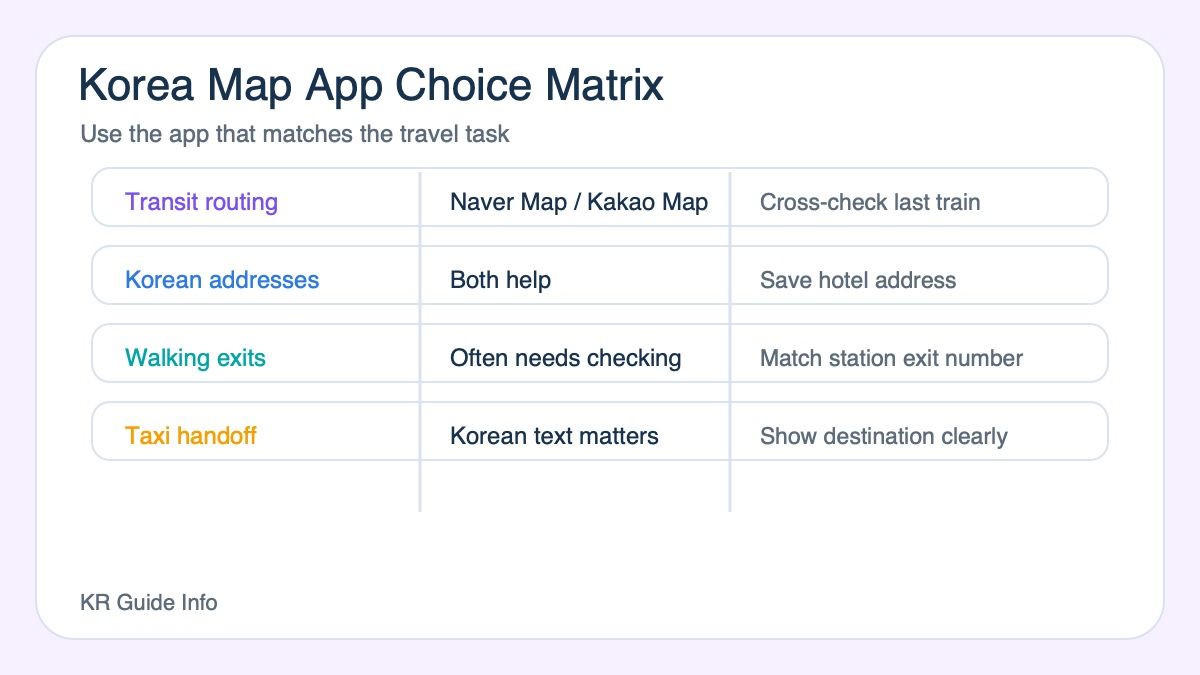
Use Naver Map or Kakao Map as your main Korea navigation tool instead of relying only on Google Maps. Naver Map often feels easier for general place search, Kakao Map can be strong for local detail, and the best choice is the one you test before your first complicated transfer.
Most travelers do not need to master every Korea mapping tool. They need one map app they trust enough to navigate confidently. That is why the Naver Map vs Kakao Map question matters in practice.
Why this app choice matters more in Korea than some travelers expect
Mapping matters because neighborhood geography, station exits, and short walking segments shape almost every city day. A weak map habit creates repeated friction, especially in Seoul and other transit-heavy parts of the trip.
That makes route confidence more important than theoretical feature count.
How to choose the better map for your own trip
- Pick the app that makes route understanding easiest for you
- Test it before departure rather than waiting until arrival day
- Use one primary map instead of switching constantly
- Save hotel and key destination addresses early
The best travel app is usually the one you can interpret fastest, not the one with the longest feature list.
Where visitors usually get stuck with map apps
The usual problem is not downloading the wrong app. It is trying to compare too many tools while already in motion. That creates hesitation exactly when quick decisions matter.
A simple committed setup usually works better than constant app switching.
Why route clarity matters more than feature depth
In travel, usability under pressure matters more than theoretical power. The app that helps you understand exits, walking time, and district shape with less effort is usually the better travel tool for your trip.
You are traveling, not running software benchmarks.
The best map-app rule for first-time visitors
Choose one main map app before the trip, learn its basic logic, and use it consistently. That is more valuable than carrying several half-understood options into every day of travel.
Simple map habits are often what make the city feel manageable.
Real traveler scenarios: when to use each map app
The Naver Map versus Kakao Map choice is not about which app is objectively best. It is about which one solves your immediate travel problem with the least confusion. Foreign visitors often struggle because Korean addresses, subway exits, bus stops, and walking routes can appear differently from the map apps they use at home.
Use Naver Map when you need broad trip planning
Naver Map is often useful when you are comparing subway, bus, walking, and place information in one screen. It can be a good first app for checking how long it takes to move between a hotel, station, attraction, and restaurant. It is also useful when you want to save places across a Seoul or Busan itinerary.
Use Kakao Map when local transit detail matters
Kakao Map can be helpful when you are checking Korean-style transport details, bus stop positions, or local place data. If a route feels confusing in one app, compare it with the other before assuming the app is wrong. The second app often reveals a different subway exit, transfer point, or bus stop name.
Use both when the cost of a mistake is high
- Airport transfers
- Concert or stadium routes with crowd controls
- Early-morning KTX or flight departures
- Routes involving luggage, children, or limited mobility
- Trips outside central Seoul where taxi assumptions can fail
Before leaving your hotel, save the destination name in Korean if possible, check the final subway exit or bus stop, and keep enough battery for the return route. The best map app is the one you have already tested before the stressful part of the trip begins.
Use both map apps for different checks
You do not need to declare one permanent winner. A practical workflow is to use one app for route discovery and the other as a cross-check when an address, business entrance, or bus stop is unclear.
| Task | Suggested workflow |
|---|---|
| Find a hotel or attraction | Search the English name, then try the Korean address if the result is ambiguous |
| Choose public transport | Compare the suggested route with your luggage, transfer count, and last-train risk |
| Find the correct entrance | Check street-level context, station exit number, and recent user information |
| Use a bus | Confirm the stop is on the correct side of the road and monitor the live stop sequence |
| Save an offline fallback | Screenshot the Korean destination name and final walking segment |
Map estimates are not guarantees. Construction, entrance closures, hillside walking, and station interiors can make a short distance take longer. For a fixed booking, verify the venue’s official address and arrival instructions rather than relying only on a user-edited listing.
Official sources
Related KR Guide Info guides
- Best Apps For Traveling In Korea What Visitors Actually Need
- How To Use Public Transport In Korea
- How To Use Seoul Buses First Time Visitors
Update log
- June 10, 2026: Added review-focused trust sections, current official source links, related internal guides, and this update log for AdSense readiness.
How KR Guide Info checked this guide
This guide was reviewed by the KR Guide Info editorial team for Naver Map and Kakao Map choice. We checked Korea map-app behavior, station-exit needs, bus/subway route planning, and traveler backup workflows, then added practical decision points for first-time foreign visitors rather than only listing places or features.
Map-app backup workflow
Do not wait until you are lost to learn both apps. Set up your main map app before the first transfer, then keep the second app as a backup for Korean names, bus stops, or taxi destination checks.
- Before leaving the hotel: save the destination and screenshot the Korean address.
- At large stations: check the exit number, not only the station name.
- For buses: confirm the direction and stop name before boarding.
- For taxis: show the Korean place name or address if pronunciation is difficult.